
NewNext batch starts 17 Oct 2026
Practical AI with Claude
Put AI to work in your business or job – in 6 days.
6 ദിവസം കൊണ്ട് AI ഉപയോഗിച്ച് നിങ്ങളുടെ ബിസിനസും ജോലിയും എളുപ്പമാക്കാം
A beginner-friendly Claude AI course in Malayalam + English for business owners & working professionals. Live online, no coding.
Already registered? Student login
Batch 2 starts in …
- 6days
- 1–1.5hours a day
- 18modules
- Onlinelive sessions
- മലയാളം + ENlanguage
- 15–20seats / batch
മലയാളത്തിൽ പഠിക്കാം
An AI course in Malayalam, built for beginners
Learn AI in Malayalam, the way you actually talk at work. Classes are in Malayalam with technical words in English, so this Claude AI course stays simple even if you have never used AI before.
- Malayalam + Englishക്ലാസുകൾ മലയാളത്തിൽ, ടെക്നിക്കൽ വാക്കുകൾ ഇംഗ്ലീഷിൽ
- For complete beginnersകോഡിംഗ് അറിയേണ്ട, ടെക്നിക്കൽ അറിവ് വേണ്ട
- Practical every dayഓരോ ദിവസവും പ്രാക്ടിക്കൽ ക്ലാസുകൾ
Who it’s for
Built for people who run things
ആർക്കൊക്കെ പഠിക്കാം?
No coding, no jargon. You bring your real work; we turn it into AI workflows.
Business owners
Shop owners, founders and managers: write customer replies in your brand voice, make quotations and company decks, teach Claude your prices and policies, check competitors, plan a month of posts and turn your sales sheet into decisions.
- Brand voice & customer replies
- Quotations, decks & brochures
- Competitor & pricing research
- Sales dashboard & growth plan
Working professionals
Office staff, teachers, HR, sales, accounts and marketing: draft emails and minutes in minutes, build project decks and proposals, research your field faster, write LinkedIn posts and turn work spreadsheets into reports.
- Emails, minutes & client replies
- Project decks & proposals
- Industry trends & new skills
- Work reports & AI work plan
Syllabus
6 days · 18 modules
എന്തൊക്കെ പഠിക്കും?
Each day of this AI for beginners course is 1 to 1.5 hours of hands-on work (about 30% demo, 70% practice), and ends with one finished piece of work.
Day 1AI basics, prompt writing & brand voice
- 1.1Introduction to AI: Claude, ChatGPT, Gemini and Copilot compared
- 1.2Prompt writing with everyday practice: emails, WhatsApp replies, review replies, minutes
- 1.3Brand voice or work voice in a Claude Project, plus safe use
You leave withA Claude Project that writes like you, plus everyday writing prompts
Day 2PPT & PDF creation
- 2.1Planning the story: company profile, vision deck or work presentation
- 2.2Creating a PowerPoint with Claude in your colours, with speaker notes
- 2.3Creating PDFs: proposals, quotations, brochures; summarising long PDFs
You leave withA 10-slide presentation and a PDF proposal or brochure
Day 3Teach AI your business / work
- 3.1Why AI gives generic answers, and how to teach it your business
- 3.2Customer and client replies that know your prices and policies
- 3.3Your SOP guide for staff or your sales follow-up writer; test and improve
You leave withClaude set up with your prices, policies and processes, plus 2 ready helpers
Day 4Research & competitor analysis
- 4.1Web search with sources and fact-checking
- 4.2Reading competitor websites by link, price comparison, review mining
- 4.3Market trends and the one-page competitor report
You leave withA competitor and pricing report (PDF + sheet)
Day 5Social media posts with connectors
- 5.130-day content calendar, captions (English + Malayalam), reel scripts, LinkedIn posts
- 5.2Posters in Canva straight from Claude, resized for every platform
- 5.3Carousels and saving everything to Google Drive
You leave withA month of posts and 5 Canva posters
Day 6Data analysis & dashboards + 90-day plan
- 6.1Spreadsheets with AI: cleaning, formulas, analysis, charts
- 6.2Dashboard, what-if decisions and a monthly report PDF
- 6.390-day plan, capstone presentation and weekly AI routine
You leave withA dashboard, a monthly report and your 90-day plan
One course, two ways
Same skill, applied to your business or your job
Business owners and professionals learn together. Every exercise has two versions, so a shop owner applies it to their business and an employee applies it to their job.
Day · Skill🏪 Business owner uses it for💼 Professional uses it for
Day 1Prompts & voiceBrand voice, customer messagesWork voice, emails, minutes
Day 2PPT & PDFCompany profile deck, quotations, brochuresProject decks, proposals, reports
Day 3Teach AI your business / workCustomer replies, staff SOP guide, sales follow-upsClient replies, minutes, HR and onboarding
Day 4ResearchCompetitors and pricingIndustry trends, tools, new skills
Day 5Social mediaInstagram, Facebook, WhatsApp posts and postersLinkedIn posts and work visuals
Day 6DataSales dashboard, growth planWork reports, AI work plan
Beyond prompting
Claude features you’ll actually use
വെറും ചാറ്റ് അല്ല
Not just chat. You’ll use the parts of Claude that get real work done.
- Day 1Chat & promptingThe RCTFEL formula for answers you can use
- Day 1 & 3ProjectsYour voice guide, and Claude that knows your business
- Day 2, 4 & 6File creationPowerPoint, PDF and spreadsheet files you can download
- Day 2, 3, 4 & 6File uploadSummarise long PDFs; read price lists, SOPs and sheets
- Day 4Web searchResearch with sources and read websites by link
- Day 5ConnectorsCreate posters in Canva; save to Google Drive
- Day 6Data analysisDashboards, what-if decisions and monthly reports
See it in action
What you’ll build in class
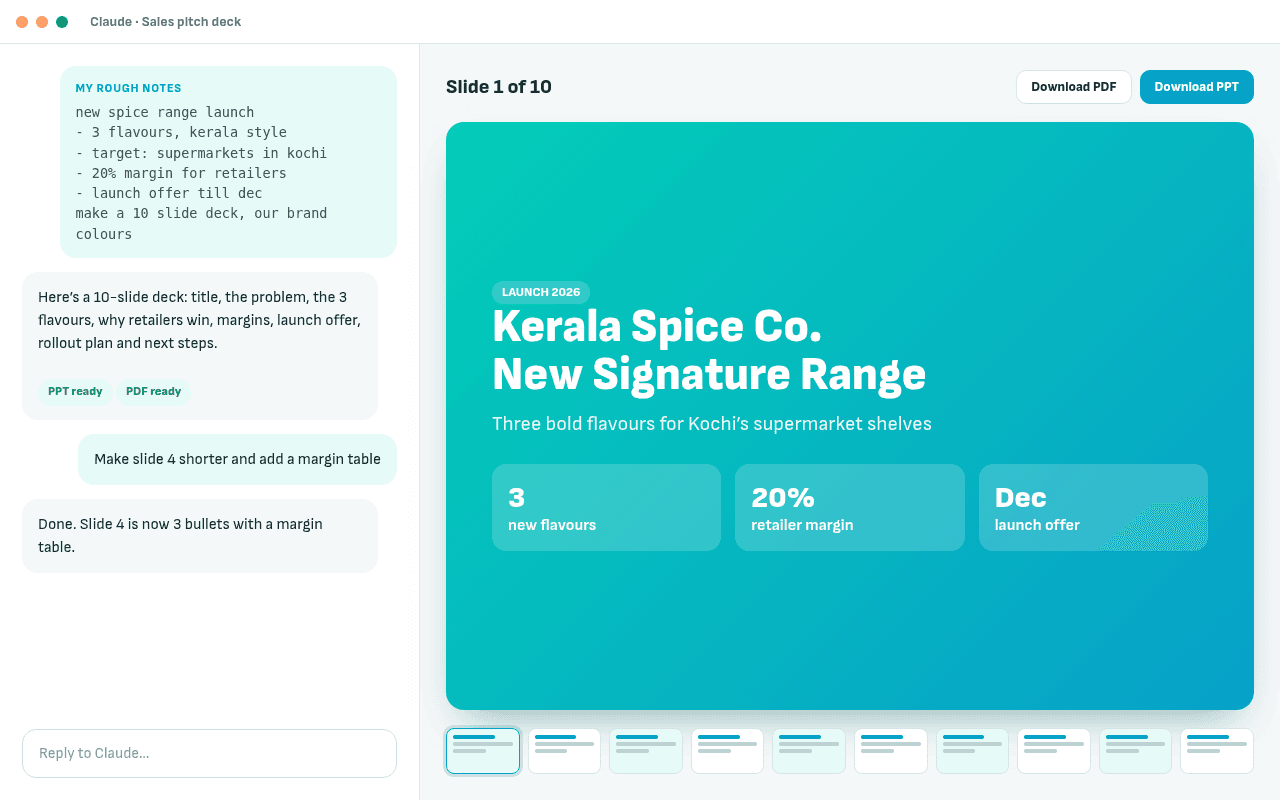
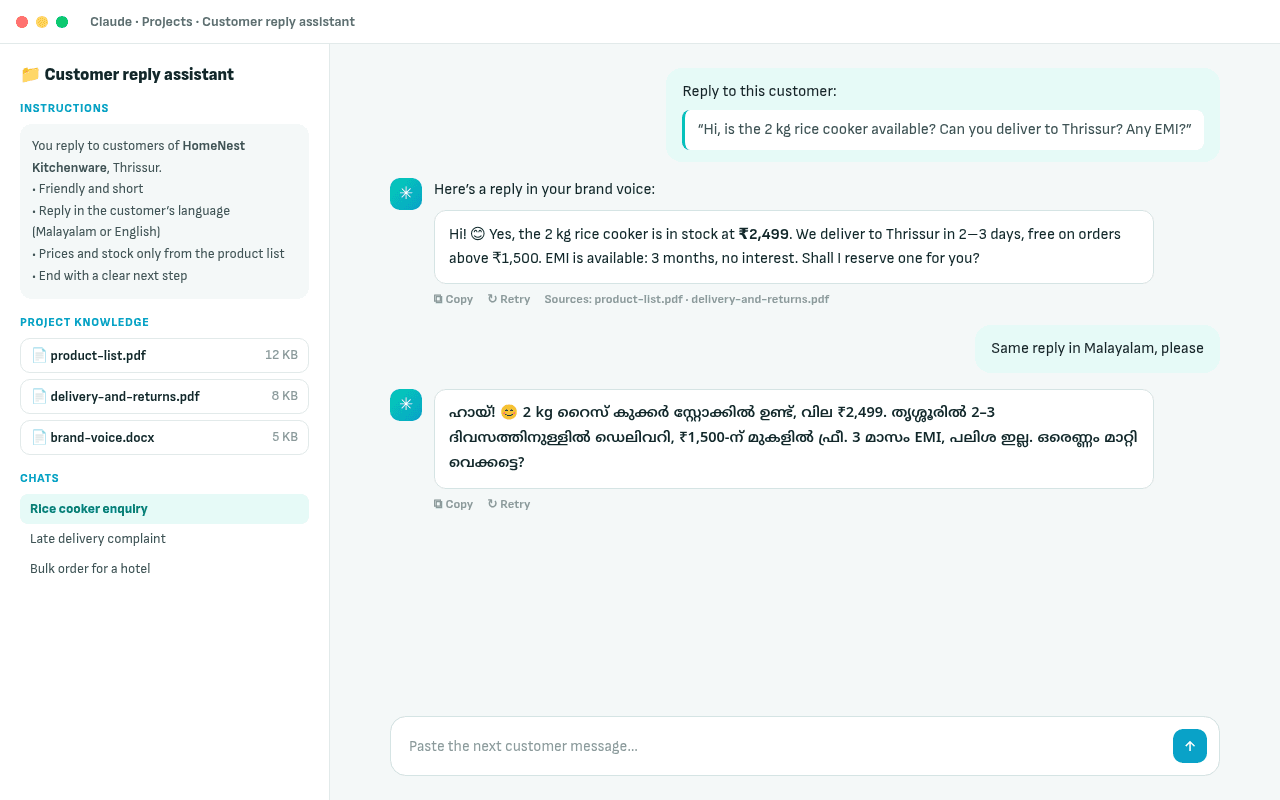
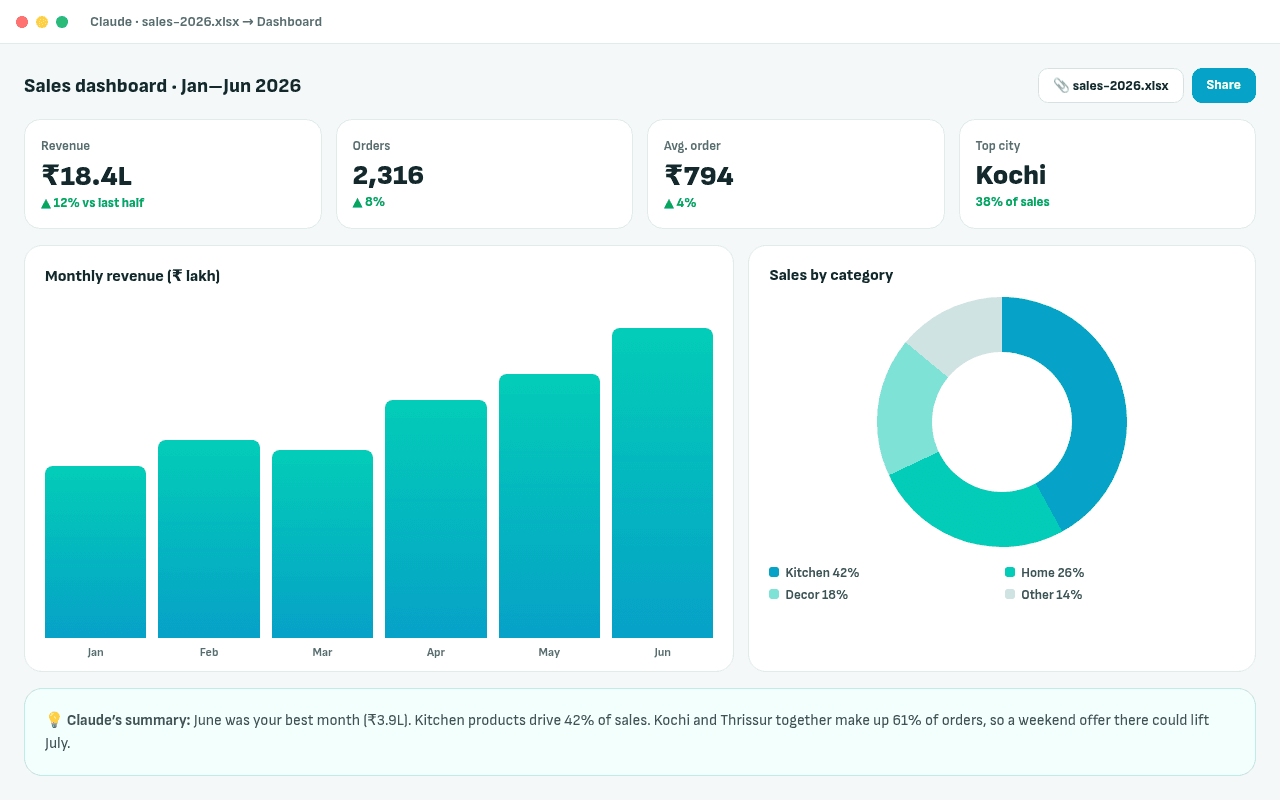
Next batch: 17 Oct 2026Fri,Sat & Sun, 07:30–9:00 PM ISTBatch starts in …സീറ്റുകൾ പരിമിതം · ക്ലാസുകൾ മലയാളത്തിൽ
Book my seat for 17 Oct · ₹4,499What you take home
8 things you’ll actually use on Monday
കോഴ്സ് കഴിയുമ്പോൾ നിങ്ങളുടെ കയ്യിൽ
- 01Voice guide & prompt kit
- 0210 tested everyday writing prompts
- 03A PowerPoint & a PDF proposal or brochure
- 04Claude set up with your business or work
- 05Competitor or research report
- 06A month of posts & 5 Canva posters
- 07Dashboard & monthly report
- 0890-day plan & weekly AI routine
Rewatch any lesson
Missed something? It’s in your dashboard.
ക്ലാസ് മിസ്സായാലും പേടിക്കേണ്ട
Every registered student gets a Loopive student dashboard with the lesson recordings. Videos pick up exactly where you stopped, and you can see your progress through all 6 days.
- Lesson recordings, day by day
- Resume from where you stopped, on any device
- Your syllabus, receipts and certificate in one place
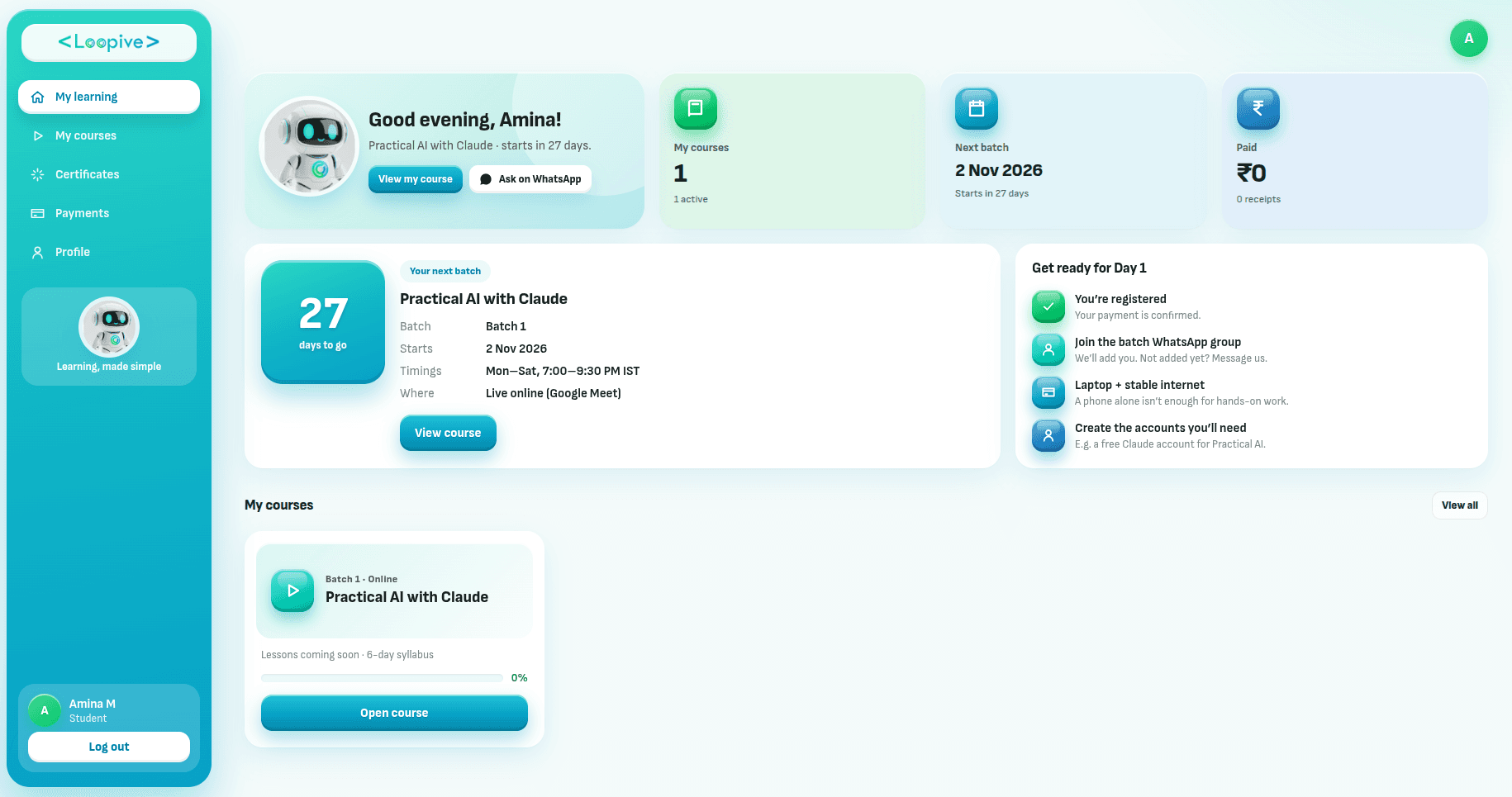
Batches
Pick your batch
നിങ്ങൾക്ക് ഇഷ്ടമുള്ള ബാച്ച് തിരഞ്ഞെടുക്കൂ · സീറ്റുകൾ പരിമിതം
Small batches of 15–20 so everyone gets help. Online only.
Register for Batch 2
Batch 1
Seats openIncluded with your seat
Bonuses that keep you going after Day 6
കോഴ്സിന് ശേഷവും കൂടെ
- Bonus 1
30-day WhatsApp support group
Ask questions while you apply what you learned at work.
Worth [₹ value] - Bonus 2
Full prompt kit (PDF)
Every prompt, template and checklist from the six days.
Worth [₹ value] - Bonus 3
Optional 1-hour review after 30 days
Show what you built; get feedback and next steps.
Worth [₹ value] - Bonus 4
Lesson recordings in your dashboard
Rewatch any session; videos resume where you stopped.
Worth [₹ value]
Certificate
A certificate anyone can verify
പൂർത്തിയാക്കുന്നവർക്ക് സർട്ടിഫിക്കറ്റ്
Finish the course and the capstone, and you get a Loopive certificate of completion with a unique certificate ID. Download it from your dashboard, add it to LinkedIn, and anyone can check it on our website.
- Unique ID, e.g. LPV-2026-7K3QX9
- Download as PDF from your student dashboard
- Public verification page
Have a certificate ID? Verify a certificate →
Sample
Certificate of Completion
This certifies that
Your Name
has successfully completed
Practical AI with Claude
Batch 1 · started 2 Nov 2026 · issued 7 Nov 2026
SignatureAuthorised signatory, Loopive
Certificate IDLPV-2026-7K3QX9Verify at loopive.com/certificates
Next batch: 17 Oct 2026Fri,Sat & Sun, 07:30–9:00 PM ISTBatch starts in …സീറ്റുകൾ പരിമിതം · ക്ലാസുകൾ മലയാളത്തിൽ
Book my seat for 17 Oct · ₹4,499- 6 live sessions of 1–1.5 hours
- Full prompt kit (PDF)
- Certificate of completion
- 30-day WhatsApp support group
- Optional 1-hour review after 30 days
- Lesson recordings in your student dashboard
Before Day 1
What to bring
A laptop
With a stable internet connection. A phone alone is not enough for the hands-on work.
Business owners
Your logo, product photos, price list, a few competitor links and 3–6 months of sales data.
Working professionals
3 routine work tasks, a sample work spreadsheet (confidential data removed), your resume and LinkedIn link.
Everyone
One long document you need summarised. A Claude account before Day 1 and a Canva account before Day 5. No sales data? We provide sample sheets.
Questions about the AI course in Malayalam
FAQs
സംശയങ്ങൾ ഉണ്ടോ?
Is this an AI course in Malayalam?
Yes. Classes are taught in Malayalam, with technical words in English, so you learn AI in Malayalam without getting lost in jargon. ക്ലാസുകൾ മലയാളത്തിൽ, ടെക്നിക്കൽ വാക്കുകൾ ഇംഗ്ലീഷിൽ.
Is this a good AI course for beginners?
Yes. It is built for beginners: no coding and no technical background needed. You start with the basics of Claude AI and prompt writing on Day 1, and by Day 6 you are building dashboards. കോഡിംഗ് അറിയേണ്ട.
Do I need any technical knowledge?
No. If you can use WhatsApp and email, you can do this course. Everything is shown step by step and you practise on your own work.
Do I need a paid Claude plan?
A free Claude account is enough to start. Free plans have usage limits, and some features (Projects, file creation, the Canva and Google Drive connectors) may need a paid plan.
Is ChatGPT the same as Claude?
No. They are different AI assistants from different companies. On Day 1 we compare Claude, ChatGPT, Gemini and Copilot side by side, and most prompting skills you learn work across all of them.
How practical is it?
Fully hands-on: about 30% demo and 70% practice on your own business or job. Every exercise has two versions, one for business owners and one for professionals, and every day ends with a finished piece of work.
How long is each session?
1 to 1.5 hours a day, for 6 days, all live online. Each day ends with one finished piece of work you can use the next morning.
Is the course online or offline?
Online only. All sessions are live, so you can ask questions as you go.
Will I get recordings?
Yes. Lesson recordings will be added to your student dashboard, where videos pick up right where you stopped.
What if I miss a session?
Watch the recording in your student dashboard, then ask questions in the WhatsApp support group or at the review session.
What is the refund policy?
Full refund if you cancel at least 3 days before your batch starts; after that you can move to a later batch for free. No refund once the course has begun. See the Refund Policy page for details.
Will I get a certificate?
Yes. After attending the sessions and finishing the capstone you get a Loopive certificate of completion with a unique certificate ID. Download it from your student dashboard; anyone can verify it on loopive.com/certificates.
Next batch: 17 Oct 2026Fri,Sat & Sun, 07:30–9:00 PM ISTBatch starts in …സീറ്റുകൾ പരിമിതം · ക്ലാസുകൾ മലയാളത്തിൽ
Book my seat for 17 Oct · ₹4,499Already registered? Log in to see your course, recordings and certificate. Student login
Register
Reserve your seat – ₹4,499
ഇപ്പോൾ തന്നെ സീറ്റ് ഉറപ്പാക്കൂ
Fill in your details and pay securely with Razorpay (UPI, cards, net banking). You’ll see your confirmation right away and get it by email.